Strange Loop 2010 video release schedule posted
Videos of Strange Loop 2010 will start dropping tomorrow on InfoQ, according to the Strange Loop blog. I am particularly excited to see sessions I was unable to attend this year.
Videos of Strange Loop 2010 will start dropping tomorrow on InfoQ, according to the Strange Loop blog. I am particularly excited to see sessions I was unable to attend this year.
This is the first in a series of articles about using the .NET software metrics tool, NDepend. Each article will focus on a particular use for NDepend, demonstrating how it helps developers “x-ray” their code to see strengths and weaknesses in design.
No one likes to experience pain, but the fact is that pain is often a very good metric for measuring the level of stupidity required for making certain decisions. For example, I have a very distinct childhood memory of touching a hot iron to determine if it was in fact plugged in. It dawned on me later, after much wailing and many tears, that perhaps looking at the outlet would have been a better approach, but if I had experienced no pain, I would not have learned. Software development is really no different, though you might not know it by examining many software projects. Many of the pain points in software development are actually indicators–signals that alert developers that there are design flaws, perhaps significant ones, in the software solution. Often under tight deadlines, budget constraints, and a small army of Pointy Haired Bosses, developers spend hours agonizing over software bugs that seem to spring from the aether. Changes in one module often break code in another, seemingly unrelated module, creating QA and maintenance nightmares that are only remedied by more duct tape, bailing wire, and bubble gum. Problems persist until, eventually, the code base becomes too fragile and tangled to change. A common cause of pain is often bad coupling, or bad dependencies, between software modules. In .NET, the unit of composition for software modules is the assembly. In general, the following principles should be applied to assemblies:
Most developers understand and agree with the first principle, but have experienced the pain and frustration of practically implementing the second and third. If a .NET assembly violates the second principle, it is said to be rigid; if it violates the third, it is said to be fragile. [Martin, Metrics] Reuse is impossible to achieve without dependencies. Assemblies hold references to other assemblies and reuse their types. Unfortunately, an assembly becomes difficult to change as its dependents increase, and as a consequence, changes to that assembly can have adverse consequences to dependents which may have no conceptual relationship to it. It would seem that, to adhere to the first principle of modular software, the second and the third must necessarily be violated. And it precisely this violation that causes so much turmoil in software projects. The good news is that principles two and three can be adhered to if abstractions (in the form of actual abstract classes or interfaces) are introduced between dependent modules. Consider the following simplified case of a dependency between two classes in two different assemblies: 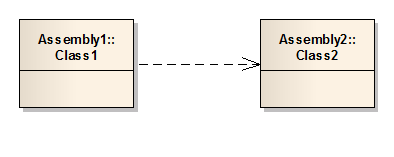 In this scenario, consider that changes to Class2 could have potential ramifications for Class1, even though Class1 may not require change to fulfill a given requirement or change request. The more classes that come to depend on Class2, the more difficult changes will be–the number of dependencies and possible side effects will cause developers to flee in panic whenever changes to Class2 are necessary. In contrast, consider the following alternative scenario:
 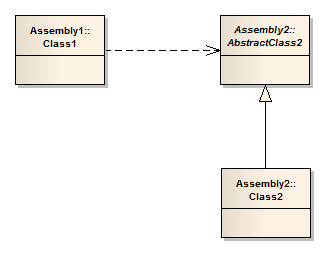 By introducing an abstraction between classes 1 and 2, the developer is free to change the implementation of Class2 as necessary without fear that it will cause other assemblies and classes to change as well. By changing the nature of the dependency across assemblies, developers can easily adhere to all three principles of modular software. It is also interesting to note that the rigid nature of the direct dependency between Class1 and AbstractClass2 also serves to crystallize the nature of abstract classes (or interfaces)–that is, the dependency itself dissuades developers from changing the public facing API of the assembly. This is the Open/Closed principle applied to assemblies. Assembly APIs should be open for extension, but closed to modification.
SO. Now that the nature of the problem is clear, how does a developer go about identifying problem assemblies and types in an application? The software metrics tool NDepend allows developers to examine their software projects and determine where pain points are so they can be eliminated. NDepend applies a number of software metric algorithms to a given code base, and presents a host of useful information about the relationships of assemblies, namespaces, types, members, variables, etc. in a .NET project. To illustrate how NDepend can help solve the assembly dependency problem, I resurrected an old .NET project from the mothballs to see exactly how bad my code violated the modular software principles. I was delighted to find that NDepend has Visual Studio 2010 integration, which makes it very easy to analyze a solution without leaving the IDE. I proceeded to upgrade my old project to VS2010 format, and attach a new NDepend project to begin my analysis. 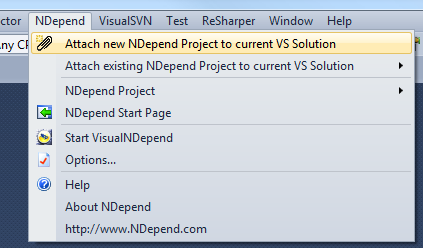 Because NDepend is such a powerful tool, it is easy to drown in the sheer number of metrics available for a .NET solution. I spent quite a bit of time reading and digesting the NDepend Code Metrics Definitions page on the NDepend website. For this specific problem, I was interested in assembly metrics, specifically:
NDepend offers a number of ways to find data, but the most versatile is the CQL query editor. CQL is a robust and, frankly, daunting domain-specific-language that enables developers to slice and dice a code base to identify solution items that meet specific criteria. As a starting point, I was interested in assemblies in my project that had a high number of incoming dependencies (afferent coupling), but a low level of abstraction. I opened the CQL editor (complete with intelisense!) and queried the code base. 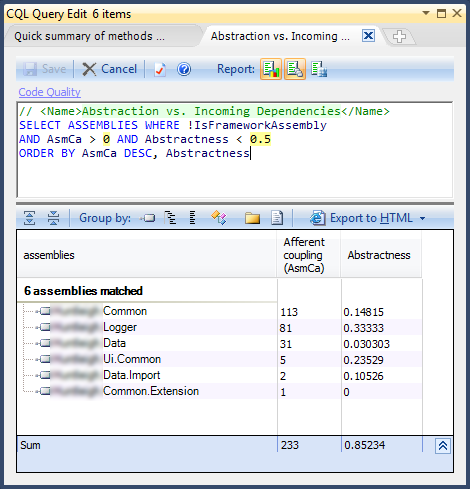 Right away, I noticed that the Common assembly has a high number of dependencies, but a very low level of abstraction, which means assemblies that depend on it are directly using its concrete types. If I made changes to Common, I would have a good change of breaking other assemblies, forcing me to change them as well. Since this project is fairly trivial in size, my deployment strategy had always been to release all assemblies in each software release. Non-trivial projects, often composed of dozens or hundreds of assemblies, fare far better if changes can be deployed on an assembly-by-assembly basis. If my Common assembly were a member of a larger project, it would require all dependent assemblies to be released whenever its concrete types were changed. It is clear that Common was an offensive assembly, but I needed to know what its dependent assemblies were to identify the exact points of Ca to be abstracted. I could have monkeyed around with the CQL editor some more to find that information, but I have a general disdain for SQL-like languages (which makes me a favorite among DBAs!), and I wanted to try out other NDepend features, so I opened the Dependency Matrix to find the information I needed. The Dependency Matrix is really as awesome as it sounds. It allows a developer to view every assembly, type, member, etc. in terms of every other assembly, type, member, etc., on a matrix that shows the number of dependencies at a given drill-down level. Since I was interested in the dependencies of types among assemblies, I adjusted the view option and got a nice breakdown.
 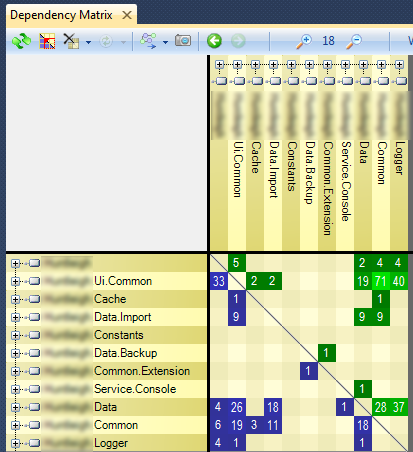 As you can see, each assembly is listed on the X and Y axis. The squares in the middle represent the number of types that have dependency relationships on the other assemblies. The green boxes represent the efferent (outgoing) coupling of the horizontal assemblies; the blue boxes represent the afferent (incoming) coupling of the same. I located Common on the horizontal axis and noticed that types from the root namespace, UI.Common, Cache, Data.Import, and Data directly used types in Common. Since I wanted to identify those types in Common that were directly referenced, I expanded the horizontal assembly node to get a more detailed view.
 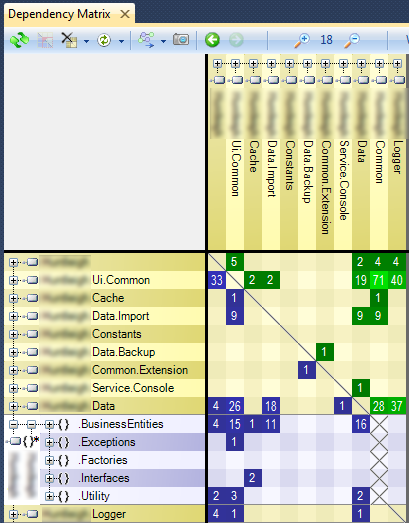 The bulk of the incoming references are for business entities, which are used in many places in the application. Now, recall that the measure of an assembly’s instability is the ratio of efferent (outgoing) coupling to total coupling. I noticed that Common, lacking any green box on its horizontal axis, references no other assemblies (framework assemblies excluded), so its instability in terms of developer-maintained code is zero. Common is a completely “stable” or rigid assembly, meaning that it is not easily changeable (like the foundation of a structure is “stable”), but it is also not very abstract, making it a very fragile assembly–both are conditions that I wanted to avoid. To fix these problems, I could have used the dependency matrix to “drill down” deeper into actual types and methods to determine the exact locations of tightly coupled code and introduce abstractions that would allow Common to maintain stability, but also allow extensibility. I was curious about other dependencies in my project, but wanted to get visual overview of the project as a whole. I opened the Dependency Graph and changed the box size setting to adjust each node in the graph by afferent coupling. The result confirmed my analysis of the Common assembly, but also highlighted the Logger assembly as another possible offender (click to enlarge).
 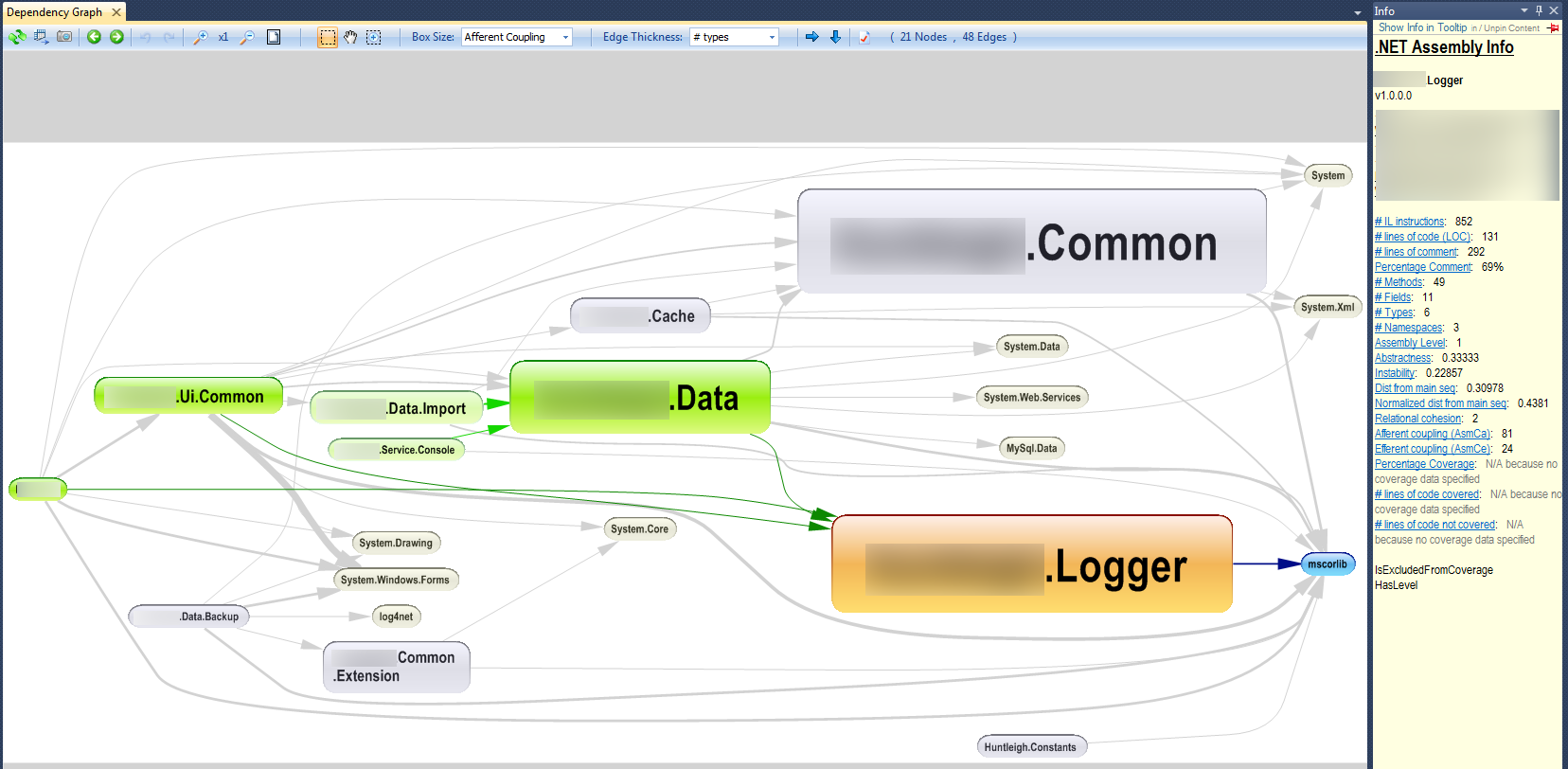 The interesting thing about this diagram is that it shows the flow of dependencies from the left to the right, and it’s very obvious that the assemblies on the right are the ones that a) need to be most stable, since they have the most dependencies, and b) desperately need to be abstract to avoid violating the second and third principles of modular software. The Dependency Graph fly-out lists detailed information about the Logger assembly, but the two items that immediately stand out are the abstractness rating (0.3, relatively close to 0), and the instability (0.2, very difficult to change). So Common and Logger have the same problems. I decided to run the NDepend Report last, which produces a comprehensive HTML file with detailed information about the entire project. I was looking for a specific diagram which illustrates, in a nutshell, the reason why dependency management is important, and I found it (click to enlarge).
 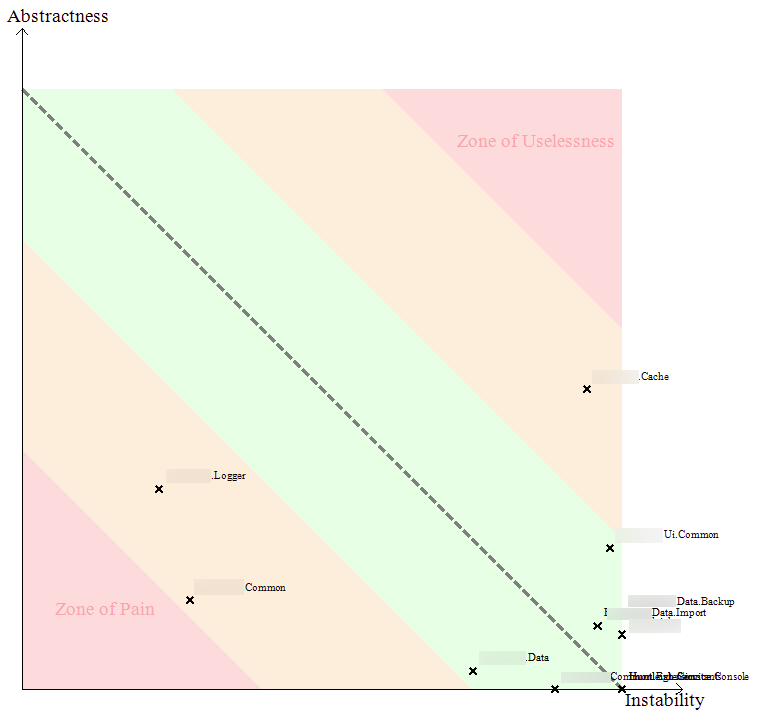 There is a lot of information in this graph, but notice the lower-left-hand corner: a special little hell known as the “Zone of Pain”. On this graph, Logger and Common occupy a sherbert-orange colored slice of the graph, just next to it. The Y axis of the graph indicates that the level of abstraction for these two assemblies is low (i.e., they contain mostly concrete classes), and the X axis indicates that each assembly has a low level of instability, i.e., a high level of stability, i.e., a large number of incoming dependencies which make it difficult for the assemblies to change. If the “Zone of Pain” is hell, the “Zone of Uselessness” is Plato’s heaven: all forms, and no substance. Classes that fall into this space have maximum abstractness (they have no concrete classes), and maximum instability, i.e., no incoming dependencies. So they are, in reality, “useless” and unused. The perpendicular position of each assembly on the graph relative to the center diagonal line is known as the “distance from the main sequence”. Notice that there is a nice green area surrounding the main sequence. This represents the ideal location that assemblies should occupy, which implies a special relationship between abstractness and afferent coupling. According to the chart, the more “stable” an assembly is, the more abstract it should be, and likewise the more “instable” an assembly is, the more concrete it should be. Assemblies that occupy the lower-right-hand corner have no dependent assemblies (think web project, for example), and can have as many concrete classes as they like, while assemblies that occupy the upper-left-hand corner should be completely abstract because their dependents are so many. As long as assemblies remain in close proximity to the main sequence, they conform to the Open/Closed principle, and will be relatively painless to modify.
My first round with NDepend pretty much kicked my ass, but in a very good way. I was able to look at a project that I was intimately familiar with in a new way, and learned that there is a very precise and quantifiable relationship between the quality of a design and the extensibility of a design. NDepend takes complicated metrics and gives developers a way to visualize data about solutions, track down problem areas, and refactor bad designs with confidence. Any software team that is serious about making robust, extensible software should consider adding NDepend to the toolbox. For further reading on assembly dependencies, I recommend the following resources:
I was doing some work with NHibernate today and encountered the following problem which made me cranky for a few minutes, but Google provided an answer for my woes, so I thought I would share it. It is generally inadvisable to create table columns with names that also happen to be reserved keywords. Sometimes this is unavoidable, however, especially since SQL Server reserves common words like “File” and “Description”. I know this, because when I attempted to execute an NHibernate query with those column names, I got this nastygram from NHibernate:
SELECT … this_.File as File2_0_, … FROM … this_
WARN: System.Data.SqlClient.SqlException (0x80131904): Incorrect syntax near the keyword ‘File’…
Some diligent internet scouring revealed that NHibernate can be instructed to quote columns by wrapping column names with the backtick ( ` ) symbol in the appropriate hbm.xml file, like so:
The generated query executed flawlessly.
SELECT … this_.[File] as File7_2_0_, … FROM … this_
Here’s my schedule for Strange Loop 2010:
Welcome! 8:30 AM - 8:45 AM in Pageant Alex Miller Welcome to the conference and last minute announcements…. http://strangeloop2010.com/talks/14315 Machine Learning: A Love Story 8:45 AM - 9:45 AM in Pageant Hilary Mason Machine learning has come a long way in recent years – from a long-marginalized field so old it still has the word “machine” in the name, to the last, best hope for making sense of our massive flows of data. The art of ‘data science’ is asking th… http://strangeloop2010.com/talks/14442 The Evolution of the Flickr Architecture, or I Love LAMP, 2010 Edition 10:00 AM - 10:50 AM in RAC Studio Mikhail Panchenko Flickr was created over 6 years ago - an eternity in tech years. While the site’s general architecture has has held up fairly well, some pieces have started creaking at the seams. A new crop of engineers has started evolving the site’s architectur… http://strangeloop2010.com/talks/14470 Adopting Apache Cassandra 11:00 AM - 11:50 AM in Pageant Eben Hewitt The Cassandra database is distributed, highly-available, fault-tolerant, and offers an elastic scaling model—all of which make Cassandra a powerful proposition for mission-critical applications. It’s used by many of the world’s biggest web propert… http://strangeloop2010.com/talks/14471 Civic Hacking 1:30 PM - 1:50 PM in RAC C/D Luigi Montanez How can software developers change cities, states, and countries for the better? Last year, we saw an explosion of interest around government transparency. The Open Government movement, spearheaded by open source developers, seeks to make governme… http://strangeloop2010.com/talks/14467 Real World Modeling with MongoDB 2:00 PM - 2:50 PM in Apollo 11 Steve Smith Learn to break out of the habits of relational databases and model your data in a better, more meaningful way using MongoDB. Find out where the flexibility of MongoDB can let you rethink how you interact with your data, and how this flexibility ma… http://strangeloop2010.com/talks/14472 Parallel Programming with Node.js 3:15 PM - 4:05 PM in Pageant Ryan Dahl Node.js is inherently a single threaded, single process programming environment – a Node script can run on at most one CPU/Core at a time. This has lead some to comment that it’s an inappropriate technology for the our high density CPU reality. N… http://strangeloop2010.com/talks/14303 How to Think about Parallel Programming: Not! 4:15 PM - 5:15 PM in Pageant Guy Steele Anyone remember the old days, when for good performance you had to worry carefully about which register should hold which variable, and when? Sometimes we still do this to get extremely high performance from critical inner loops, especially when u… http://strangeloop2010.com/talks/14299 Strange Passions Party 7:00 PM - 9:30 PM in Pageant You! Strange Loop 2010 will feature the return of the enigmatic Strange Passions track. Strange Passions is an opportunity for conference attendees to present short (10 minute) talks on non-technical topics. Passionate developers tend to be passionate… http://strangeloop2010.com/talks/14502
Enterprise NoSQL: Silver Bullet or Poison Pill? 8:30 AM - 9:30 AM in Pageant Billy Newport NoSQL has become the latest darling technology. We will examine its roots, why it became popular in that context, and whether it can extend its reach into mainstream enterprise applications. http://strangeloop2010.com/talks/14447 JavaScript Functions: The Good Parts - Idioms for Encapsulation and Inheritance 9:40 AM - 10:20 AM in RAC Studio Scott Bale Pretty much anything interesting in JavaScript happens with functions. Because of their peculiar properties, a number of unusual idioms have emerged around using them for encapsulation or inheritance. You may be surprised to learn of the possibili… http://strangeloop2010.com/talks/14464 Classes are Premature Optimization 10:25 AM - 11:00 AM in RAC Studio Justin Love Classes are premature optimization, forcing the programmer to freeze method implementations and often memory layouts during the design stage in order to make things easier for the compiler writer. Classes are also accidental complexity forcing the… http://strangeloop2010.com/talks/14475 Lunch benefiting ByteWorks 11:00 AM - 11:30 AM in Pageant Lunch will be available (but not required) for $20 with all profits going to benefit St. Louis non-profit organization ByteWorks. Lunch can be purchased ahead of time through the registration system OR some lunches may be purchased on-site (but av… http://strangeloop2010.com/talks/15701 Panel: “Non-Relational Data Stores“ 11:30 AM - 12:00 PM in Pageant Rusty Klophaus, Roger Bodamer, Chris Biow, Steve Harris, and Mike Malone This panel will be moderated by Ken Sipe and focus on the future of nosql and other non-relational data stores. [http://strangeloop2010.com/talks/15702](http://strangeloop2010.com/talks/15702 “Panel: “Non-Relational Data Stores””) Panel: “Future of Programming Languages” 12:10 PM - 12:50 PM in Pageant Guy Steele, Alex Payne, Josh Bloch, Bruce Tate, and Douglas Crockford This panel will be moderated by Ted Neward and focus on the future of programming languages, language features, concurrency, and more. [http://strangeloop2010.com/talks/15703](http://strangeloop2010.com/talks/15703 “Panel: “Future of Programming Languages””) Using F# To Solve Real World Problems 1:00 PM - 1:50 PM in Apollo 8 “Aaron Erickson, ThoughtWorks, and @AaronErickson” So you have seen a few sessions on F# that introduce the concept. Maybe you are now excited about functional programming - or maybe you need a little more convincing to really see how it is used in the “real world”. Come to this session, and see e… http://strangeloop2010.com/talks/14494 Hidden Web Services: Microformats and the Semantic Web 2:00 PM - 2:50 PM in RAC Studio Scott Davis The hard line between web pages (pure presentation) and web services (pure data) is finally beginning to blur. Companies as varied as Best Buy, Twitter, Facebook, LinkedIn, Flickr, TripIt, O’Reilly, and even People magazine have decorated their we… http://strangeloop2010.com/talks/14460 jQuery - RIA Miracle! 3:15 PM - 4:05 PM in RAC C/D Mark Volkmann Developing rich internet applications using HTML, CSS and JavaScript is now a common exercise. While it can be done using only those client-side technologies, JavaScript libraries greatly simplify the task. They also shield developers from most br… http://strangeloop2010.com/talks/14468 Heresy and Heretical Open Source: A Heretic’s Perspective 4:15 PM - 5:15 PM in Pageant Douglas Crockford This whirlwind tour looks at software from the unlikely premise that there is goodness in JavaScript, and that Intellectual Property Law has drifted broadly away from its original purpose, becoming a significant obstacle to the Progrefs of Science… http://strangeloop2010.com/talks/14301 To see the full conference schedule, visit http://strangeloop2010.com/calendar
This is not an tirade against the anatomical accessories we possess that aid us in digestion. I have nothing against these organs presently. RATHER this article is a tirade against the use of the English language symbol “:”, specifically between a user interface label and a field to which the label is attached. For example: Name: [_______________] People. If you have an obvious label next to your user interface field there is no need for the colon. It is completely superfluous. Colons mean: “ending the old, beginning the new”. But when you look at a user interface like this, do you think, “god, I am so thankful that the designer put a COLON there, lest I confuse the text box/radio button/check box with the label!”? No, of course you don’t. Now, if you have two labels next to each other, or a label next to a paragraph, and the text decorations such as font-size, color, emphasis, etc. do not make it very plain that the label and the text to which it refers are in fact separate user interface elements, it would be appropriate to include a colon. For example: Name: None of your business I am not a professional designer, nor do I claim any special experience in the dark arts of the crayola. But what I do have is an eye for efficiency. And reading damn colons next to form fields interrupts my serene form-filling experience, so stop using them and I will stop hating. That is all.
 The ALT.NET community is a loosely coupled, highly cohesive group of like-minded individuals who believe that the best developers do not align themselves with platforms and languages, but with principles and ideas. In 2007, David Laribee created the term “ALT.NET” to explain this “alternative” view of the Microsoft development universe–a view that challenged the “Microsoft-only” approach to software development. He distilled his thoughts into four key developer characteristics which form the basis of the ALT.NET philosophy:
The St. Louis ALT.NET meetup group is a place where .NET developers can learn, share, and critique approaches to software development on the .NET stack. We cater to the highest common denominator, not the lowest, and want to help all St. Louis .NET developers achieve a superior level of software craftsmanship. Join us by becoming a member of the St. Louis ALT.NET meetup.
I remember when I wrote my first unit test. It happened at a point of realization – I had enough experience writing code that the pain of software bugs started to outweigh the joy of software development. I’d heard about unit tests from friends, read about them on blogs, heard about them at conferences. When I inevitably wrote my first test, it was pretty frightening. I understood enough about unit tests to limit each test to a single class method or property, but I did not understand that dependencies would be my undoing. My early tests traversed all layers “downstream” of the object under inspection, and even queried the database and live web services. My tests tended to look like this:  Since those early days, I’ve learned a lot about unit testing, specifically that it helps you break your dependencies so that your code can be tested in isolation. Testing across software “layers”, i.e., testing a unit of code and its dependencies can be considered anti-testing, and actually gives you false confidence in your system when, in reality, it is a fragile cacophony. 1. Tests across layers require an exponential number of tests. Every developer who writes dependency-traversing unit tests eventually comes to the sickening realization that no matter how many tests he writes, the possible combination of parameters and possible code branches that could be executed in any given test is, well, staggering. For every new layer, or every new dependency, the number of tests for a given member would be raised to the value of the number of tests for that dependency. In contrast, if the dependencies of a given unit of code are mocked or stubbed for the purposes of unit testing, the developer only has to write the tests that would test the code immediately under inspection. In other words, breaking dependencies = additive, keeping dependencies = exponential. 2. Tests across layers require simulated application state. Any developer maintaining a large config file for his tests knows how much of a pain this is. If the application relies on:
then code that relies on this state, either directly or through dependencies, must have unit tests that recreate it for every test run. Again, this can be very prohibitive, especially if the volume of configuration data is vast, or in relatively inaccessible places (e.g., other threads). 3. Tests across layers can give false positives. A unit test is typically named for the unit of code being tested, for example, CalculateCartTotal_SomeState_SomeExpectedResult(). If this unit test spans application layers the developer who wrote it won’t immediately know if an error in the test is a result of a calculation failure, corrupt database data, missing session values, etc. The test might fail for reasons that have absolutely nothing to do with calculating a shopping cart’s total price. Precious development time is often spent debugging test paths to determine where the offending dependency lies. 4. Tests across layers can give false negatives. Because of #1, it is possible that all tests for a given method will pass, even though the method itself is flawed. This can occur because the chance of a developer missing a given combination of state and behavior in a unit test is significant. This is possible in test suites where dependencies are removed, of course, but is far less likely given the reduced number of possible tests and the ability to simulate known state (by mocking and stubbing) that will produce exact, expected results. 5. Unit tests are for code, not data or connectivity validation. A common justification I hear for encouraging unit tests that cut across application layers is: “It helps us know if our data is correct.” This justification confuses the role of unit tests and integration tests. Unit tests are designed to determine if code functions properly, not if a given system can connect or retrieve data from another system. Integration tests help us to validate those boundaries, but unit tests are only concerned with the behavior of code. The validation of data should occur as close to the data source as possible, even within the data source if possible. 6. Unit tests across layers are slow. One of the primary benefits of dependency-ridden unit tests is that they are fast. A developer can run a suite of unit tests in a matter of seconds, or minutes if the code base is particularly large. This means that the developer gets instant feedback about changes made to the system. If unit tests cross data access boundaries, or query live services, performance will drop dramatically. In a high-pressure deadline-driven environment, this encourages developers to ignore unit tests altogether, or leave them for “later” (you know, the later that never comes). Without unit tests as a feedback mechanism the developer will revert back to the days of design-by-debugging. 7. Remember: testing the sum of the parts = testing the whole! So if dependencies are bad in unit tests, how does one test the system in tot0? If all dependencies are tested in isolation, that is, without reference to, or reliance on, any other testable code, they will work when combined if all unit tests pass. Software systems should be decoupled anyway – your code should have a sparse number of direct references to concrete types, and instead, rely on references to abstract classes or interfaces which can easily be mocked or stubbed with mocking frameworks. Real unit tests help you see where these dependencies are, and eliminate them.
 In this example, ClassA has a direct dependency on ClassB, as show by field _b. When a unit test is written for SomeMethodThatUsesB(), ClassB will directly affect the outcome of the test. In contrast, If ClassA depends on an interface for ClassB:

then the implementation of ClassB can be replaced with a mock object with known state and behavior, that will affect the unit tests for SomeMethodThatUsesB() in a known and controllable way. Not only is this good unit test design, it is good object design as well (the implementation for ClassB can be extended in your application without breaking classes, like ClassA, that depend on the interface IClassB).
The good news is that writing correct and accurate unit tests will make you a better developer. The bad news is that people often feel a warm fuzzy feeling if their tests span layers in an application, because they believe it offers better “coverage”. Nothing is further from the truth. Breaking applications down into discreet units and testing each unit in isolation, under controlled conditions, is the only way to achieve accurate test results and prevent those early AM calls from disturbing your beauty sleep. Now go forth and test.
St. Louis .NET developers had a busy weekend last Friday and Saturday – over 650 of them attended the third annual St. Louis Day of .NET. The conference, which began in a crowded WashU meeting room three years ago, has pulled speakers, attendees, and sponsors from all over the United States, and has even gained the attention of Microsoft. For $200 (or $125, if registrants took advantage of the early bird special), attendees were treated to over 100 sessions on .NET-oriented technologies, open discussion sessions, a great party at Ameristar’s HOME nightclub, and a special keynote by Microsoft representative Brian Goldfarb. Secondary perks like great swag, prizes, networking, and a used bookstore (that donated all proceeds to charity) added to the legitimacy of the event. The Midwest is often eclipsed by the big conferences on each coast, but last weekend that didn’t matter – St. Louis developers had a solid, professional, mature conference to call their own. I attended a number of interesting sessions, a few of which I will briefly enumerate here (IEnumerable
This morning’s short read is “5 Types of Comments to Avoid Making in Your Code“. No developer doubts the benefit of good comments, but when the signal-to-noise ratio tips in favor of noise, productivity can actually be hindered. I know I’m guilty of using at least one of these forbidden comment types in my code, but
//TODO: finish this blog post
I’m working on an ASP.NET website where I need to generate dynamic CSS, mostly for “theming” purposes. I really don’t like .NET skins or themes – I prefer straight CSS and markup; besides, it needs to be configurable through an administration page and persisted to a database. Here are the options I’m contemplating:
If anyone has experience with this, please let me know what solution you settled on.